Volvo Cars
- 3.6
- Rating
- 1.00M
- Installs
- Free
- Price

 Analysis by App-foxy
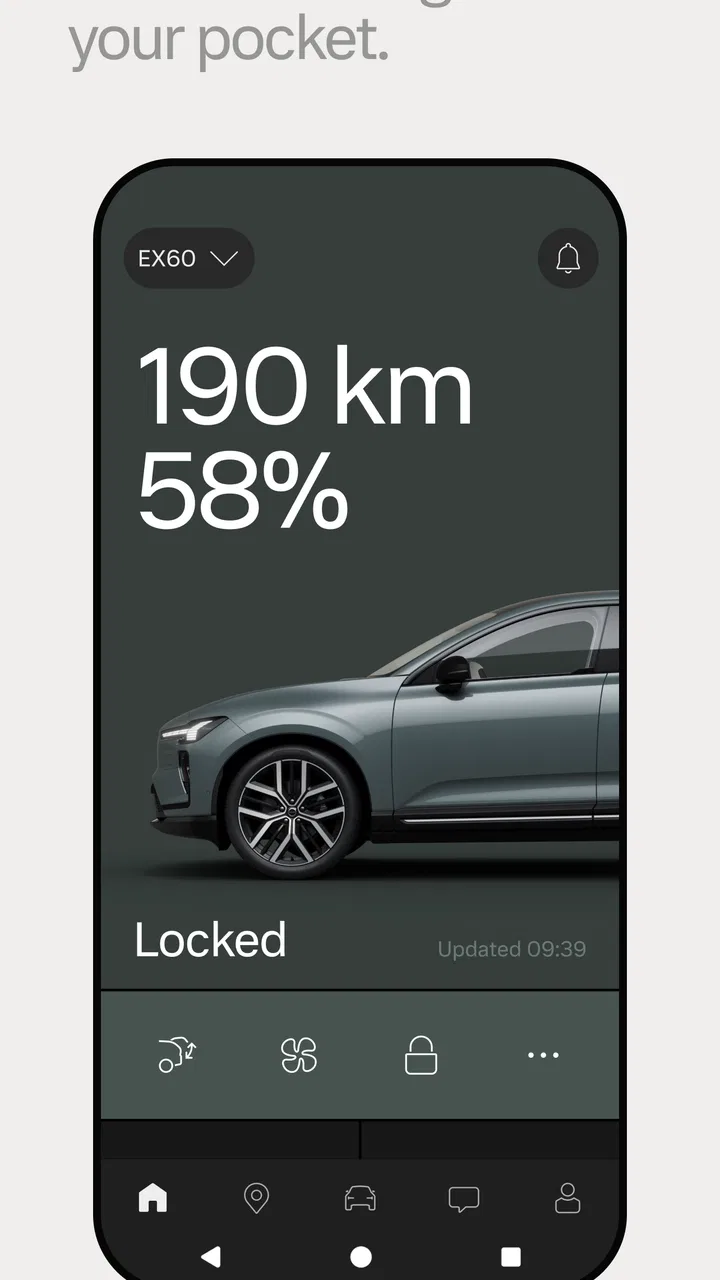
Owning a Volvo can make driving feel carefully considered, but the relationship with the car does not end when you leave the driver’s seat. Volvo Cars is the official companion app from Volvo Cars, built for people who want a more direct way to stay connected with their vehicle. I found its value less in flashy extras and more in how it can turn small ownership tasks into repeatable habits.
This is a free Auto & Vehicles app for Everyone, and it has been available since June 4, 2014. The current release is version 6.6.0, with support starting from Android 8.0. It has passed the million-install mark and holds a 3.8 average from roughly fifty-eight thousand ratings, alongside about two thousand written reviews. Those figures suggest a widely used app with a noticeably mixed experience, which matches my impression: it can be genuinely useful, but its success depends heavily on the Volvo model, connected services available to that car, and how consistently you use it.
How I would build a dependable daily workflow
The best way to approach this app is not to open it randomly whenever you remember it exists. I would set it up as part of a simple ownership routine. First, make sure the correct Volvo is associated with the account and spend a few minutes checking the vehicle information that appears. This matters particularly in households with more than one car, where choosing the wrong vehicle before checking a status or preparing a trip can create unnecessary confusion.
You May Also Like

 Blood Strike: 2.5 Anniversary
Blood Strike’s Loadouts Turn Every Drop Into a Tactical Gamble
A close look at Blood Strike’s custom loadouts: how fast access to signature weapons reshapes its battle royale rhythm, rewards preparation, and narrows the gap between fights.

 Pandora - Music & Podcasts
Pandora’s Music Is Easy to Start, but Harder to Recover
Pandora’s strength is its low-effort path from a seed to a station. Its weak spot is how much confidence it asks you to place in connection, setup, and quiet recovery.

 8 Ball Pool
 Is Built on Rivalries, Rematches, and Routine
A close look at the rivalries, rematches, shared routines, and unanswered safety questions that turn a quick pool match into a persistent mobile community.

 Samsung Music
’s Quiet Strength Is Playing What You Already Own
Its reach comes less from spectacle than from dependable access to a personal library. That simplicity is both the app’s strongest retention engine and its ceiling.

 AccuWeather: Weather Radar
AccuWeather Review: A Quick, Clear Forecast for Everyday Decisions
For everyday plans, the best forecast is the one you can understand quickly. AccuWeather makes rain timing, radar, and local conditions easy to act on, with a few trade-offs.

 Hill Climb Racing
Why Hill Climb Racing Still Turns Crashes Into One More Run
A tiny car, a bumpy hill and one more upgrade: Hill Climb Racing keeps resurfacing because its simple chaos makes every near-miss feel personal.
More From Our News Desk
View All News


After that initial check, I would use the app at three natural points: before leaving, after parking, and when planning a longer journey. Before leaving, the useful question is whether the car is ready for the trip. After parking, the app becomes a quick reference for the vehicle rather than something you need to keep mentally tracking. During trip planning, it can complement the navigation and charging tools already used in the car or on the phone, depending on the vehicle.
That routine is more practical than treating the app as a replacement for every other driving tool. I still prefer the car’s own controls for anything that needs immediate attention while driving. A phone app is most comfortable when the vehicle is stationary, and Volvo Cars makes more sense as a preparation and ownership companion than as a screen to operate constantly on the road.
A realistic example is a cold weekday morning. I can check the vehicle before putting on my coat, confirm that I am looking at the right car, and prepare the journey before walking outside. If the app’s connected functions are available for my vehicle and account, this is also the point where remote controls can be more convenient than going back outside. The important habit is to use one short check rather than repeatedly opening the app and waiting for information to refresh.
For a family car, the same workflow helps with handovers. One person can check the vehicle before a trip, while another can use the app later without needing every detail explained verbally. It is not a substitute for agreeing who is driving or where the car is parked, but it reduces the small ownership frictions that otherwise accumulate during a busy week.
What the first setup tells you
During setup, I would pay close attention to which parts of the experience are immediately available and which depend on the specific Volvo. The app is not a universal remote control for every car carrying the badge. Vehicle generation, connected equipment, market, account configuration, and service availability can all affect what appears. That is why I would judge the app after pairing it with the actual car, not from screenshots or from another owner’s experience.
This is also where expectations need to stay realistic. The official status of the app does not mean every Volvo receives identical functions. A newer connected model may offer a richer experience than an older one, while some owners may mainly use the app for information and ownership support. I consider that variation one of the most important things to understand before installing it.
I also recommend allowing the initial setup to finish without rushing through every screen. If a function is important to you, test it while the car is parked and nearby. That gives you a better idea of the normal response and avoids discovering a problem when you are already late for work. I would not rely on an untested remote action as the only way to prepare the car for an urgent departure.
Settings that are worth checking early
The most valuable settings are the ones that reduce repeated work. Check notification preferences first. Too many alerts make an ownership app easy to ignore, while too few can remove the reason to keep it installed. I prefer notifications that relate to something I am likely to act on, and I would silence anything that merely encourages me to open the app without a clear purpose.
Next, review account and vehicle details carefully. A small mismatch in ownership information or vehicle selection can make otherwise useful functions feel unreliable. If another family member uses the car, agree on whose account handles the main connection and how the app will be used. This is a mundane step, but it prevents the common mistake of treating an account problem as a vehicle problem.
Privacy and phone permissions deserve a practical look as well. I would grant only the access needed for the functions I actually use, then revisit those choices after an update. The right balance depends on whether I want location-related convenience, trip assistance, or only basic vehicle information. Keeping permissions intentional makes the app feel less intrusive and makes troubleshooting easier.
Phone battery settings can also affect the experience. If the operating system aggressively limits background activity, notifications or refresh behavior may feel delayed. I would not immediately assume the car or Volvo service is at fault. Checking the phone’s battery optimization rules, notification permission, and network connection is a sensible first troubleshooting pass before signing out or reinstalling.
Another useful habit is to keep the app and the phone’s operating system reasonably current, while avoiding an update immediately before an important journey if I have not tested the result. The current version, 6.6.0, is the release associated with this review, but the practical lesson is broader: after a major app change, open it while parked, verify the vehicle connection, and make sure the functions you rely on still behave as expected.
Shortcuts that make regular use faster
The fastest pattern is to decide in advance what the app is for. If I mainly need vehicle status, I open it for that single purpose and close it. If I am preparing a journey, I gather the relevant information in one session rather than checking the same screen several times. This sounds obvious, but it prevents the app from becoming another source of digital clutter.
I would also place the app somewhere easy to reach on the phone, but not in a position that encourages use while driving. A home-screen shortcut is useful when I regularly check the car before leaving. It is less useful if I keep opening the app out of habit without needing anything. The goal is a predictable action: unlock the phone, open Volvo Cars, select the correct vehicle, complete the task, and move on.
For owners who use connected features, a repeatable pre-trip checklist works well. I would check the car, review the planned destination or journey information, and confirm any preparation step while stationary. If something does not respond, I would try once more after checking the network and account state rather than repeatedly tapping the same control. Repeated commands can create uncertainty about whether the first request worked.
Long-term owners can make the app more useful by tying it to existing routines. For example, a weekly check before a long commute can combine vehicle information with a glance at the planned route. A seasonal check can remind me to review permissions, notifications, and account access. These are not secret functions; they are simple habits that extract more value from the official connection without pretending the app can replace maintenance or careful driving.
One subtle advantage of using the official app is continuity. Third-party vehicle tools may collect information from several brands, but they can be less tailored to a particular Volvo and may require separate accounts or integrations. Volvo Cars keeps the ownership relationship in one place. The trade-off is that it is less appealing if I own several different brands and want one neutral dashboard for all of them.
Where it is stronger than ordinary alternatives
Compared with relying only on the car’s physical key and dashboard, the app adds a layer of preparation that I can access before entering the vehicle. That is its clearest strength. I can think about the car while standing away from it, rather than waiting until I am seated and ready to leave. For owners who regularly forget where they parked, prepare a vehicle for a family member, or want a central place for Volvo-related information, that convenience is meaningful.
Compared with a general navigation app, Volvo Cars has a different role. A navigation specialist will usually be the better choice for live traffic, route discovery, and broad map features. I would not install Volvo Cars expecting it to replace every navigation habit on my phone. Its advantage is the connection to the vehicle and the ownership context, not being the most flexible mapping tool available.
Compared with a generic vehicle-management app, the official option has a more direct relationship with Volvo’s own ecosystem. That can make it the sensible first choice for a Volvo owner, especially when a function depends on the car rather than on manually entered fuel, mileage, or service records. On the other hand, someone who wants detailed expense tracking, maintenance logs across multiple vehicles, or extensive customization may prefer a dedicated motoring app.
The rating of 3.8 shows why I would avoid calling it flawless. A connected app can feel excellent on one vehicle and merely adequate on another. Delayed updates, account friction, inconsistent connectivity, or limited model support can outweigh the convenience for some users. The official status is a reason to try it, not a guarantee that every interaction will be smooth.
Advanced limits and sensible workarounds
The biggest limitation is dependence on conditions outside the phone screen. The app needs the right account, a supported vehicle connection, and a working network path. If one of those links fails, the interface may offer little comfort. I treat it as a convenience layer rather than as a safety-critical system. A locked car, a prepared cabin, or a refreshed status is helpful, but I still verify important details directly once I reach the vehicle.
This matters particularly when remote actions are involved. I would use them only when the car is parked in an appropriate place and I can understand the result. I would not use the app as a way to bypass normal awareness of the surroundings. If the phone says a request is processing, I wait for a clear result and then check the vehicle when practical instead of sending the command again and again.
Another limit is that the app may not answer every ownership question. It can support the connected relationship with the car, but it does not remove the need for scheduled maintenance, roadside assistance procedures, or the vehicle handbook. When a warning appears on the dashboard, I use the car’s own warning information and the appropriate professional guidance rather than assuming the phone app is the complete diagnosis.
Travel can expose another weakness. If I move between areas with poor reception, I would prepare anything important before leaving and avoid depending on a live connection at the last moment. The app is most comfortable when used in a stable environment with time to recover from a failed refresh. That is a reasonable trade-off for connected convenience, but it is worth planning around.
People who should skip it are those without a compatible Volvo connection, drivers who want one app for several vehicle brands, and users who dislike account-based services for simple car ownership. It may also disappoint anyone expecting a full maintenance ledger, advanced trip analytics, or a universal replacement for navigation. In those cases, a general vehicle-management or navigation app may be a better fit, with Volvo Cars kept only if a specific connected function proves useful.
On the other hand, I think it is a strong candidate for a Volvo owner who prefers official tools, wants a repeatable pre-trip routine, and values checking the car before walking outside. The app is especially convenient for households where the vehicle is shared, because a consistent account and vehicle-selection habit can reduce confusion. I would still test the exact functions on the actual car before making them part of an essential routine.
My verdict after making it part of ownership
The real strength of Volvo Cars is not that it tries to do everything; it is that it brings the connected side of a Volvo into a familiar phone workflow. When I use it with a clear purpose, it saves small amounts of time and gives me a better sense of readiness before a journey. When I open it without a plan, or expect it to behave identically for every Volvo, the weaknesses become much more noticeable.
As a free app from Volvo Cars, it is an easy first option for owners who want the official companion experience. The Everyone age rating also makes it broadly suitable in a household, although the usefulness still depends on the vehicle and account arrangement. Its million-plus installs show that it is established rather than experimental, while the mixed average reminds me to judge it by my own model and daily needs.
My recommendation is to install it, complete setup carefully, and test the functions you care about while parked. Then keep only the notifications and permissions that support a real habit. If the app helps you prepare trips, check the car, or manage connected tasks without extra effort, it earns its place on the phone. If it adds account maintenance without giving you a function you actually use, removing it is perfectly reasonable.
For me, the best result comes from treating Volvo Cars as a quiet ownership assistant: check it before a journey, use it for the tasks that belong to the vehicle, and keep a backup plan for anything important. That approach makes the app more dependable and avoids expecting a phone companion to replace the car, the dashboard, or common sense.
FAQs for Volvo Cars
01What features does the Volvo Cars app offer?
The Volvo Cars app provides a range of features designed to enhance your vehicle experience. You can remotely lock and unlock doors, start the engine, and pre-condition the climate. Additionally, the app offers vehicle tracking, maintenance alerts, and service booking, ensuring your car is always in optimal condition.
02Is the Volvo Cars app compatible with all Volvo models?
The app is compatible with most modern Volvo models, particularly those equipped with the latest connectivity features. However, some functionalities may vary based on the model and year. It's recommended to check compatibility details on the Volvo website or contact your local dealership for specific information.
03How secure is the Volvo Cars app?
Security is a top priority for the Volvo Cars app. It utilizes advanced encryption protocols to protect user data and ensure secure communication between your device and the vehicle. Additionally, features like remote access require authentication, providing an extra layer of security to prevent unauthorized use.
04Can I use the Volvo Cars app without a subscription?
Some basic features of the Volvo Cars app may be available without a subscription, but unlocking the full range of functionalities typically requires a subscription plan. These plans often include advanced features like remote engine start and vehicle tracking. It's advisable to review the subscription options available in your region.
05What should I do if I encounter issues with the Volvo Cars app?
If you experience any issues with the app, first ensure that it is updated to the latest version. Restarting your device or reinstalling the app can also resolve minor glitches. For persistent problems, check the Volvo support page or contact their customer service for assistance with troubleshooting.
Pros
- User-friendly interface for easy navigation.
- Comprehensive vehicle status updates.
- Remote control features enhance convenience.
- Integrated route planner for efficient travel.
- Seamless connectivity with smart devices.
Cons
- Limited compatibility with older car models.
- Occasional connectivity issues reported.
- Some features require premium subscription.
- Battery usage can be high on smartphones.
- Initial setup can be a bit complex.

Volvo Cars
Gallery